Colonial Spirits runs their retail operation through mPower point-of-sale and their e-commerce through WooCommerce. The problem: these two systems had no native connection. Every product added to the POS had to be manually recreated in WooCommerce. Every price change had to be applied twice. Every stock movement on the shop floor left the e-commerce inventory stale until someone manually updated it.
For a liquor retailer with a large catalogue across spirits, wine, and beer categories with complex pack-size variations, the manual synchronisation burden was significant and the margin for error was high.
In a retail environment, incorrect inventory is not just an operational inconvenience - it is a customer experience failure. A customer who adds an out-of-stock product to their cart and reaches checkout before finding out it is unavailable does not come back. A price displayed incorrectly online erodes trust. The mPower POS is the source of truth. Everything needed to flow from it to WooCommerce automatically, without any manual step in between.
The plugin connects to the mPower API and runs a full synchronisation pipeline on a cron schedule: pulling the complete product catalogue, mapping categories, importing product data to WooCommerce, updating inventory levels, and handling multi-pack variations - all automatically with no manual intervention once configured.
mPower API Product Pipeline
Product names, descriptions, SKUs, and pricing flow through a structured mapping layer from mPower’s data model to WooCommerce. Product attributes (size, type, vintage) are imported as WooCommerce attributes for use in filtered navigation and variation management.
Configurable Brand-to-Category Mapping
mPower’s product hierarchy does not map directly to WooCommerce’s customer-facing category structure. A configurable mapping layer lets the store administrator control how mPower categories translate to WooCommerce categories without developer involvement - when a new spirit brand is added to the POS, the administrator maps it in plugin settings and subsequent imports place it correctly.
Multi-Pack Variation Handling
Products available in single bottles, 4-packs, and 6-packs are one product in mPower but require multiple WooCommerce variations with independent stock levels. The plugin creates and maintains the variation structure on first import and updates stock on the specific variation that moved rather than applying a blanket quantity to the parent product.
Paged Batch Processing with Timeout Protection
A full-catalogue sync in a single PHP execution would hit max_execution_time limits before completing. The paged processing model breaks the import into batches that each complete within the execution limit, with a checkpoint mechanism tracking progress between cron runs. A partial run resumes rather than restarts.
Real-Time Import Monitoring Endpoint
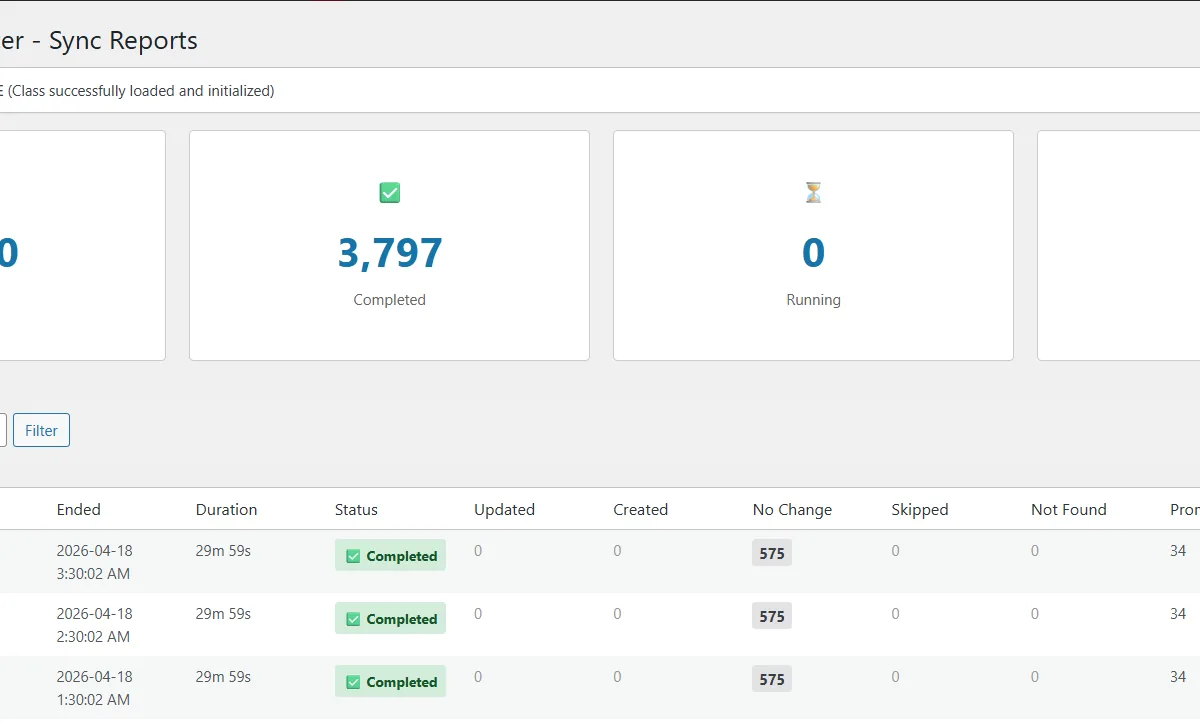
An import status API gives the administrator visibility into sync state - what has processed, what is pending, whether the last run completed cleanly - without requiring server log access.
Failed Import Recovery
All API errors are logged with full context. Transient failures are retried automatically. Persistent errors are flagged for administrator review without silently continuing with incorrect data. Specific failed products can be re-processed without running the full catalogue import again.
WP-Cron Scheduling with Monolog Logging
Scheduled sync runs via WP-Cron with full run logging through Monolog. Every sync cycle is logged with timing, record counts, and any errors - giving the administrator a complete audit trail of sync operations.
Price Tier Management
mPower pricing levels - which may differ from standard retail price for certain account types - sync to WooCommerce’s pricing system, keeping online prices consistent with what POS operators see.
The WooCommerce store now reflects the mPower POS in real time on a cron schedule. Product data, pricing, and inventory levels flow automatically from the POS to the online store. The double-entry process is eliminated. The store administrator configures the sync once and monitors it through the status endpoint.
Following the initial build, Colonial Spirits moved to an ongoing monthly maintenance retainer covering WooCommerce and plugin updates, security monitoring, and integration health checks as the mPower API evolves. The developer who built the integration maintains it - which means API changes or WooCommerce compatibility issues are caught by someone who understands the full sync architecture.
Composer Dependency Management
The plugin uses Composer for dependency management, with Monolog as the logging library. Dependencies are bundled into the plugin package rather than relying on shared Composer autoloading in the WordPress environment.
Idempotent Sync Operations
Each sync run is designed to be idempotent - running the same import twice produces the same result as running it once. This matters for the checkpoint resumption model: a resumed partial run does not create duplicate products or double-apply price changes.
Variation Stock Independence
WooCommerce variation stock is tracked at the variation level, not the parent product level. The plugin manages this correctly for multi-pack products - a 6-pack going out of stock updates only the 6-pack variation, leaving single bottle availability unaffected.
mPower API Pagination
The mPower API returns products in pages. The plugin tracks the last processed page as a WordPress option, allowing the next cron run to continue from where the previous run stopped rather than restarting from page one.