






Woocommerce mPower POS Importer

Connects mPower point-of-sale to WooCommerce automatically. Full catalogue sync, real-time inventory updates, multi-pack variation handling, and cron-based batch processing built for large retail operations.

POS Integration Retail WooCommerce
Woocommerce mPower POS Importer

How It Works

1

Configure the API Connection

Enter your mPower API credentials in the plugin settings. It validates the connection and reads your catalogue structure.

Map Your Categories

Map mPower brands and categories to your WooCommerce tree once. Store administrators can update the mapping without developer help.

Run the Initial Import

The first full import populates WooCommerce from mPower. Batch processing handles large catalogues across multiple cron runs.

Automated Sync Takes Over

Cron handles all subsequent updates. Products, prices, and inventory stay in sync without any manual step required.

Your POS Is the Source of Truth. Keep WooCommerce in Sync.

Built for retailers running mPower at the counter and WooCommerce online - eliminate the double-entry bottleneck for good.

Full Catalogue Sync

Names, SKUs, descriptions, pricing, and inventory pulled from the mPower API and written to WooCommerce automatically. No manual step after setup.

Real-Time Inventory Sync

Stock levels update from POS to WooCommerce on every cron run. The online store reflects actual shelf inventory.

Multi-Pack Variation Handling

Single, 4-pack, and 6-pack configurations tracked with independent stock and pricing per variation. Created on initial import, maintained through every sync.

Configurable Category Mapping

mPower brands map to WooCommerce categories through an admin settings interface. New product lines added without touching code.

Batch Processing with Checkpointing

Paged API calls with progress tracking across cron runs. Large catalogues sync completely without PHP timeouts or restarts.

Monitoring and Error Recovery

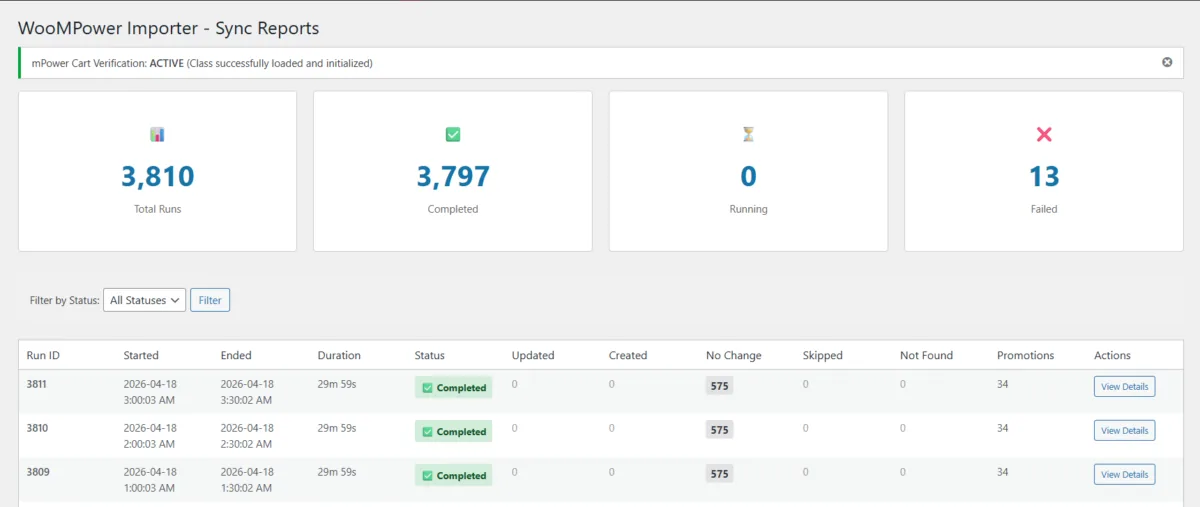
A status endpoint shows sync state, record counts, and failed items. Individual failures re-queue without triggering a full catalogue run.

The double-entry problem for retailers sounds manageable until you add up what it actually costs. Colonial Spirits runs their physical liquor operation on mPower POS and their online store on WooCommerce. Two separate systems, no native connection. Every product added to the POS had to be manually recreated in WooCommerce. Every price change applied twice. Inventory movements on the shop floor left the online store showing stale stock until someone caught up.

For a liquor retailer with hundreds of SKUs across spirits, wine, and beer - many with complex pack-size variations - that gap compounds fast.

I built the Woo mPower Importer to close it.

The plugin connects to the mPower API on a WordPress cron schedule and runs a full sync pipeline: product names, SKUs, descriptions, pricing, categories, attributes, and inventory levels pulled from the POS and written to WooCommerce automatically. The first run imports the full catalogue. Every run after that keeps it current.

Multi-pack handling is built for how retail actually works. A single SKU might sell as a single bottle, a 4-pack, and a 6-pack - each with independent pricing and stock tracking. The plugin creates the WooCommerce variation structure on initial import and maintains it through subsequent syncs. Stock tracked per variation, not just at the parent product level.

Category mapping is admin-configurable. mPower's brand hierarchy maps to the WooCommerce category tree through a settings interface that store administrators can update without touching code when new product lines are added.

Batch processing with checkpointing makes the sync safe for large catalogues on shared hosting. Each cron run processes a page of API results within PHP's execution time limit, records progress, and picks up exactly where it left off on the next run. A status endpoint shows sync state, record counts, and any failed items - no server log access required.

Following the initial build, Colonial Spirits moved to a monthly maintenance retainer. I maintain the integration as the mPower API evolves and WooCommerce major versions ship. Compatibility issues get caught by the person who understands the full sync architecture - not someone reading the code under pressure for the first time.

Running a POS System Alongside WooCommerce?

I build custom WooCommerce sync plugins for any POS or inventory management system with an API - Lightspeed, Square, Shopify POS, custom ERP systems. Tell me about your setup.