WordPress MCP Setup in Toronto
WordPress MCP setup connects Claude and other AI tools to your site, so they can publish content, set SEO fields and run security checks for you. I install and configure it with every permission scoped and every action logged. MCP is a permission surface, not a plugin you activate and forget.
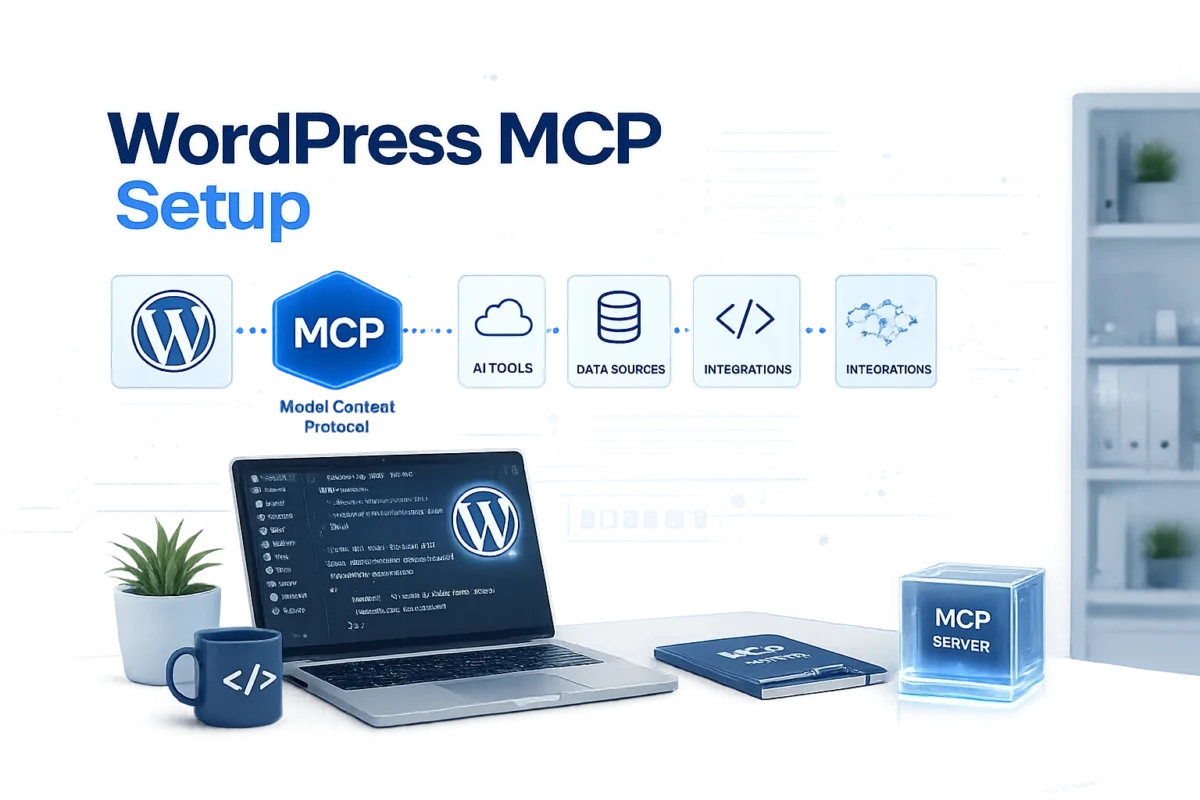
How Connecting AI to WordPress Actually Works
MCP is not a plugin you activate and forget. It is a permission surface, and what you expose through it is the entire decision.
Today Your Tools Stop at the Clipboard
The assistant drafts, a person carries the result into the dashboard, sets the fields and hits publish. The thinking is automated; the operating is not.

WordPress 6.9 Added an Abilities API
Plugins can now declare what they are able to do in a machine readable form. That declaration is the missing half of the problem, and on most installs nobody has switched it on.
MCP Is the Adapter That Translates It
The Model Context Protocol turns those declared abilities into operations Claude, Cursor and similar clients can discover and call. No custom integration per tool.
Discovery Replaces Bespoke API Work
The client asks your site what it can do and receives a list. Nobody maintains a hand written wrapper that breaks on the next plugin update.

The Risk Moves From Access to Scope
Once a tool can act, the question is no longer whether it connects. It is which operations it may perform, under whose role, and what the record shows afterwards.

Installed Defaults Expose Far Too Much
Left as it arrives, the adapter offers hundreds of capabilities to anything holding a credential. Installing takes minutes. Deciding what to withhold is the work.
How Does My WordPress MCP Setup Process Work?
Stack Review
Twenty minutes on your hosting, plugins and publishing routine. I come back with the abilities relevant to you and the ones that are noise.
Install and Connect
I handle installation and transport on your site. Your team touches nothing. At the end a client can reach the site and enumerate what it offers.

Lock Down the Surface
The allowlist is written, roles scoped, logging turned on. Then I try the operations that should fail, to confirm they do. An untested configuration is a guess.
Handoff and Walkthrough
Config files, the written ability record, and a call to go through it together. Anything beyond the standard package is quoted after that call, never folded into it.
What the WordPress MCP Configuration Covers

Abilities API and Adapter Installation
I activate the Abilities API, install the adapter, and confirm the site returns a valid capability list to a client that asks. Anything less is not connected.

Transport, Credentials and TLS
HTTP transport so remote tools reach the site, application passwords issued per tool rather than shared, and certificate verification checked rather than assumed.

Which Plugin Abilities Are Worth Exposing
Rank Math brings titles, descriptions, redirects and 404 logs. Wordfence brings firewall state and blocked addresses. I enable what your team uses, nothing else.

An Allowlist, Never the Default Set
Every operation is enabled by name. Nothing is available merely because it shipped enabled. If an ability is off the list, the tool cannot see it exists.

Permissions Scoped by WordPress Role
The credential a tool holds inherits a role, and that role sets its ceiling. An editor level connection cannot install a plugin, however the request is phrased.

Logging You Can Actually Read Later
Every call is recorded with its ability, actor and timestamp. When something changes unexpectedly you find out what did it in minutes, not by guesswork.
What Is Included in WordPress MCP Setup?

A Fixed Setup Fee From $500
The standard package is quoted before I start. Scope moves the number only when the stack does: multisite, a custom plugin, or a documented compliance review.

Config Files Ready for Your Tools
Claude Desktop and Cursor configuration files written for your site and tested against it. Your team pastes them in and the connection is live.

A Written Record of Every Enabled Ability
One document listing what is switched on, which role it runs under, and why. Six months from now that page answers the question nobody else can.

A Walkthrough With the Person Who Built It
Thirty minutes on what your team can now ask for and how to phrase it. Not an account manager reading notes back. The person who did the configuration.

Thirty Days of Support After Handoff
Questions, adjustments and the corrections that surface once real people start using it. Included in the setup fee, not billed at the first email.

Read Only First, Write Access Second
I recommend starting with abilities that fetch and report but change nothing. Once your team trusts what it sees, I open write operations deliberately rather than all at once.
Also Available on Request
Extensions to the standard package, priced with the engagement:
n8n Workflow Integration
Wiring MCP into a workflow engine, so the site becomes one step inside a larger process.
Multisite Networks
One configuration across a network, scoped per site rather than by a single shared credential.
Custom Ability Development
Registering abilities for an in house plugin that will never get MCP support upstream.
WooCommerce Operations
Order, stock and product abilities, treated as write sensitive from day one.
Compliance Documentation
The written evidence your security team wants before an external tool reaches production.
Quarterly Configuration Review
A revisit as new plugins register abilities, keeping the allowlist current.
Where This Fits, and Where It Does Not
The Sites Where This Pays for Itself
Fifty pages or more, a team already using AI tools daily, and a publishing routine that repeats the same six clicks every time.
Agencies running several client sites see it fastest, because the saving multiplies by installs rather than by posts.
The Sites Where I Will Tell You Not To
Under ten pages, doing it by hand beats configuring anything. WordPress.com free and personal tiers cannot run this at all.
And if nobody on the team uses an AI client yet, MCP is a bridge with one end unbuilt. Get the tools in use first.
Three Levels, Depending on How Far You Go
The standard package is installation, transport, a scoped allowlist and handoff. Adding one custom workflow that drives WordPress from outside puts it near $1,500.
Enterprise engagements start around $3,000: a full plugin audit, ability mapping against your own tooling, and a security review written for people who ask hard questions.
What This Is Not, and What It Pairs With
This is about a machine acting on your site. Whether a machine can understand your site in the first place is a separate question, answered by a WordPress AI readiness assessment.
Building the pipelines that use this connection day to day is WordPress AI automation. The marketing side, tracking whether assistants cite you at all, runs through HYPESTUDIO, the agency I co-founded.
Frequently Asked Questions About WordPress MCP Setup
Partly, and the honest answer is that the supported list is still short. A handful of plugins register abilities today, WordPress core and Rank Math and Wordfence among them.
I audit your stack during the review and tell you which are covered, which are not, and whether the covered ones are the ones you care about.
It is as safe as the allowlist you give it, which is why I treat that list as the deliverable rather than the installation.
A connection restricted to reading SEO fields and reporting firewall state cannot damage anything. A connection left on defaults can delete content. Same protocol, entirely different exposure.
No. Your team keeps using Claude or Cursor exactly as before, and the tool works out on its own what your site is able to do.
There is no new interface and no syntax to memorise. The change is what the assistant can finish without a person completing the job.
Yes, and you should expect to. More plugins register abilities each release, so a configuration written today will be missing useful things within a year.
Adding them later is small, contained work. That is why I hand over the written record: the next change starts from a document instead of an investigation.
You find it in the log, identify which ability produced it, and revert. That is why logging goes in during setup rather than after the first incident.
It is also why I start clients read only. The first month is for watching what the tools try to do before they are allowed to do it.
Find Out What MCP Can Reach on Your Stack
Send me your plugin list and I will tell you which abilities are available today and whether that set is worth wiring up. If it is thin, I will say so.
Beyond client projects, I'm also co-founder of HYPESTUDIO.
It's a separate AI automation agency (not a WordPress service) building workflows, agents, and systems for growing businesses.
Visit HYPESTUDIO.orgAI automation, integrations & growth systems